The phone rings. The booking is in within seconds.
Phone bookings and walk-ins go into the same book as online bookings. You see straight away whether there is room, and if the guest has been before, the system remembers them for you.
- One book for all bookings
- Guest recognition
- On phone, tablet or computer
Type the phone number, it knows the rest
With the first digits of the phone number or the first letters of the name, the system finds the guest and fills in their details. You know whether they are a regular, whether they have an allergy and whether they once failed to show up, before you hang up.
- Phone or walk-in with one tap, so they are counted correctly in your analytics.
- Times with free seats or “full”, if you have set a capacity.
- Confirmation email to the guest with one tick, if they have an email.
- Table assigned automatically, if you use the table floor plan.
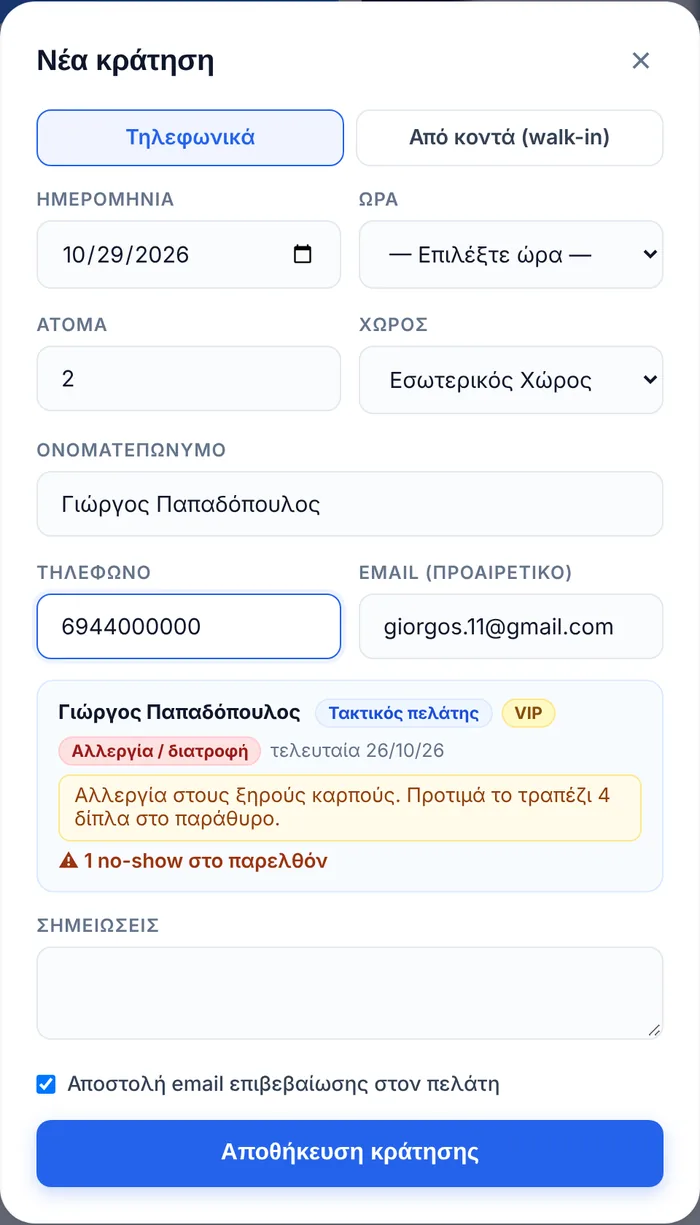
Online, phone and door, in one place
No more notebook next to the till, and no more bookings written down in two places.
On every device
Whatever one person adds from their phone, everyone sees immediately, on the tablet at the pass and on the computer.
Changes without crossing out
Change the time, party size or notes, and send the guest an email with the new details if you like.
Arrived or no-show
Mark who arrived, and the guest profile remembers every visit and every no-show.
Know where they come from
Phone, walk-in and online bookings are counted separately in your analytics and in the PDF report.
About phone bookings and walk-ins
How quickly can I add a phone booking?
In a few seconds. Tap “New booking”, choose the day, time and party size, and type the name and phone number. If the guest has been before, their details are filled in as soon as you type the first digits of the phone number or the first letters of the name.
Can I see whether there is room while I am on the phone?
Yes. Next to each time you see how many guests have already booked and, if you have set a capacity, the free seats or a “full” label. You can also add a time outside the list with “Other time”.
What do I see for a guest who has been before?
How many times they have visited, whether they are a regular, when they last came, their tags (VIP, allergy, prefers outdoors, attention), your notes, and a warning if they ever failed to show up.
Does the guest get a confirmation?
If you enter their email, you can send them a confirmation with one tick. The email contains all the details, buttons for their calendar and Google Wallet, and a cancellation link. On the day, they also receive a reminder 2 hours before.
How do I record walk-ins?
From the same form, by choosing “Walk-in”. They are counted in your analytics separately from phone and online bookings, so you know how many guests come without a booking.
What if the guest changes the time or party size?
Open the booking, make the change and, if you like, send them an email with the new details. If the floor plan is on, the table is checked again and changes by itself if needed.
Try it in your own restaurant
14 days free with every feature, no card required. Then from €99 a year, with no commission per booking.