Bookings around the clock, wherever guests find you
One link for Instagram, Google Maps and your website. Guests book a table in a few seconds and get an instant confirmation, and you see the booking on your phone the moment it is made.
- No commission per booking
- Instant confirmation
- 8 languages
Your restaurant, not a list of restaurants
The booking page shows only your restaurant: photo, logo, address, phone and opening hours. Guests choose a day, party size and time. If you set how many guests you accept per time slot, full slots are not shown.
- Your own link, tablereserve.gr/your-restaurant, which you can change yourself.
- Opening hours per day and how many guests you accept per time slot.
- Area, occasion and comments: indoors or outdoors, birthday, anniversary, allergies.
- In the language of the guest’s phone, in 8 languages.
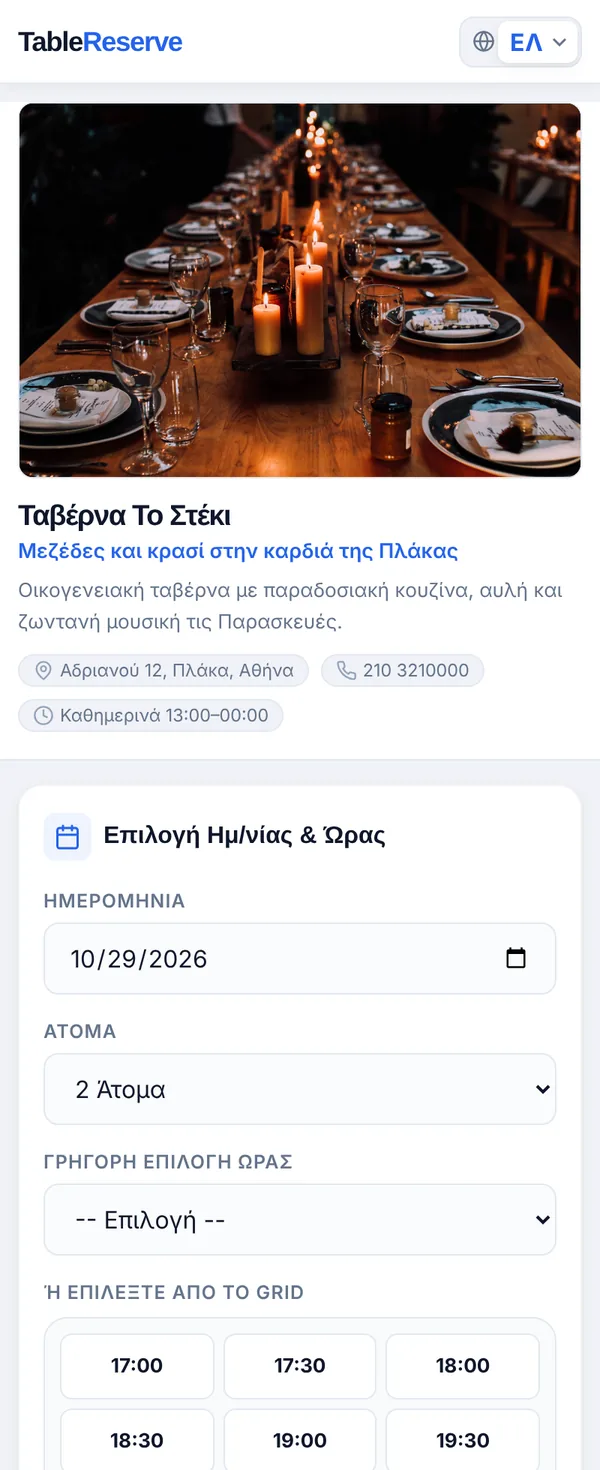
One system, every channel
Wherever guests find you, the booking ends up in the same book, and you know where it came from.
Google Maps
A ready-made link for the bookings field of your Google Business Profile. Bookings from there are counted separately as “Google”.
Instagram and Facebook
The link in your bio or in a story. Bookings that come from social media show up in your analytics.
Your website, WordPress and Wix
A form inside the page or a “Book a table” button with two lines of code. There are ready-made apps for WordPress and the Wix App Market.
Phone and walk-in
Your staff add them in seconds from the admin panel, seeing which times still have room.
Two lines of code, and you are ready
Copy the code from the admin panel and paste it where you want the form to appear. If you prefer a button instead of a form, change one word.
About online bookings
How do I get my booking link?
As soon as you create an account, you get a link like tablereserve.gr/your-restaurant. You can change the name yourself from the admin panel, and the old link keeps working.
Can I add bookings to my own website?
Yes, in two ways: as a form inside the page, or as a “Book a table” button that opens the form in a pop-up. Copy two lines of code from the admin panel and paste them into your website. You can choose the colour and language.
My website is on WordPress or Wix. What do I do?
For WordPress, install the TableReserve plugin from the official WordPress plugin directory and enter your restaurant ID in its settings. For Wix, add the TableReserve app from the Wix App Market and connect your account. No coding is needed in either case.
How do I add a booking button to Google Maps?
In the admin panel you will find a ready-made link for your Google Business Profile. Paste it into the bookings field of your profile and guests can book a table from Google Maps. These bookings are shown separately in your analytics as “Google”.
How do I know where each booking came from?
Every booking records its source: Google, your website, social media, direct link, phone or walk-in. Your analytics show which channel brings you the most guests.
What happens when a time slot is full?
You set how many guests you accept per time slot. When a slot is full, it is no longer shown as available, and guests can join the waitlist instead of leaving.
In which languages does the booking page open?
It opens automatically in the language of the guest’s phone: English, Greek, German, French, Italian, Spanish, Turkish or Portuguese. Confirmation and reminder emails arrive in the same language.
Is there a commission per booking?
No. You only pay the subscription, however many bookings you get. The booking page shows only your restaurant, not suggestions for other restaurants.
Try it in your own restaurant
14 days free with every feature, no card required. Then from €99 a year, with no commission per booking.