Your dining room on screen, table by table
Draw your tables once. Every new booking goes to the right table by itself, and your staff see live which tables are free, which are booked and where guests are already seated.
- Included in your plan
- On tablet and phone
- 8 languages
This is how it changes in the restaurant too: free, seated, booked, with one tap. Tables 3 and 4 are joined for a party of 8.
You know the answer before you pick up the phone
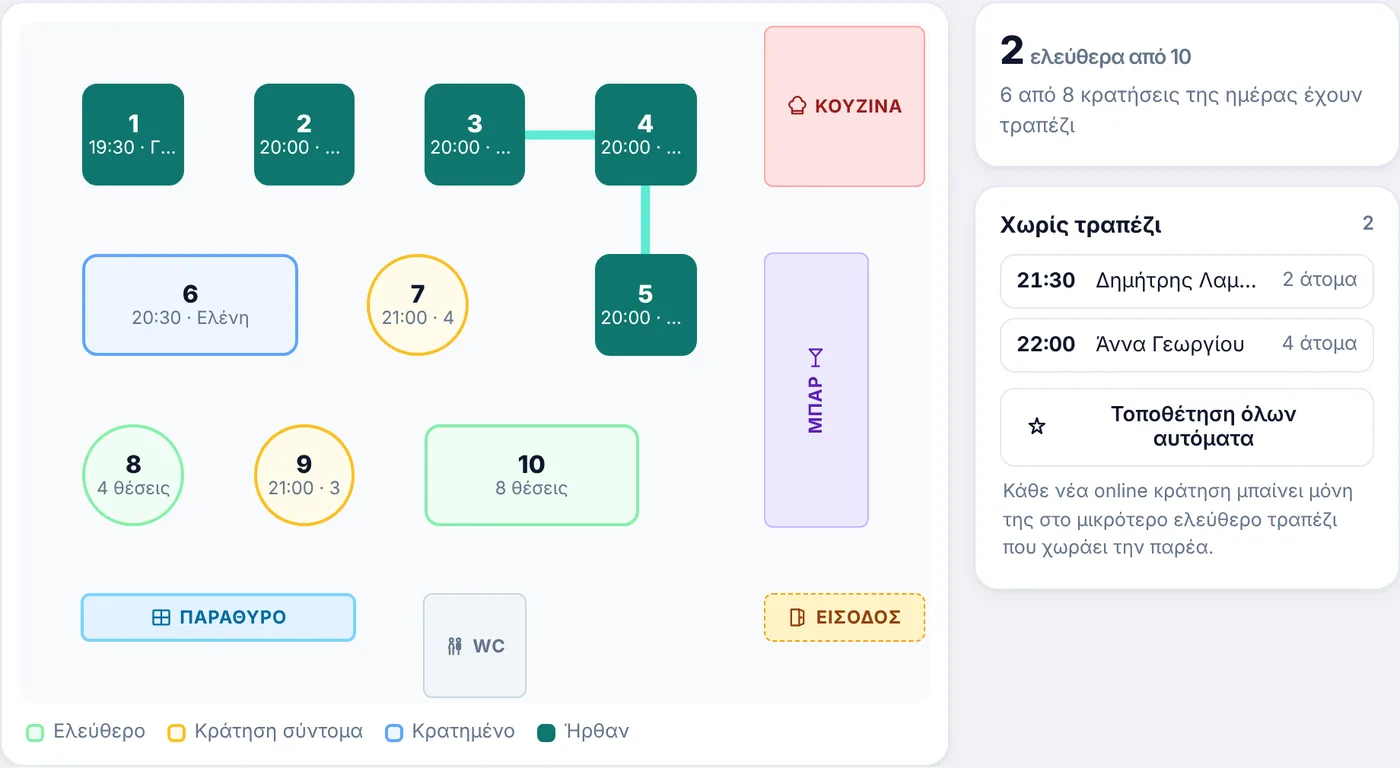
Choose a day and time and see the whole room in colour. When someone asks “do you have a table for four at nine?”, the answer is already in front of you.
- Four states. Free, booked soon, booked, seated.
- How many are free at that time, in a single number.
- “No table” list for bookings that have not been placed yet.
- Tap a table to see all its bookings for the evening.
Every booking at the right table, by itself
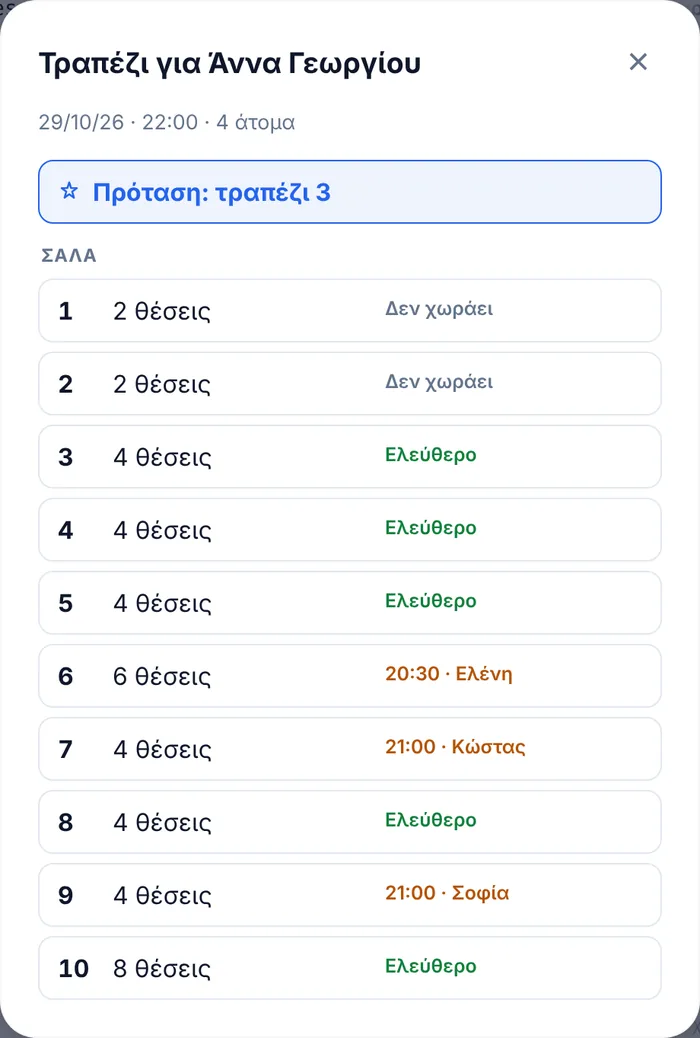
As soon as an online booking comes in, or a phone booking from your staff, the system places it at the smallest free table that fits the party. That way a table for six is not taken by a couple.
- Large groups: if the party does not fit one table, it uses the table joins you have set.
- A suggestion with one tap on every booking, and next to each table whether it is free or who has it.
- “Place all automatically” for bookings made before you turned on the floor plan.
- You have the final say. Change the table whenever you like.
From paper to screen in three steps
You do not need drawings or technical skills. Every change is saved instantly.
Enter your tables
“12 tables, 4 seats” and tap Create. The floor plan builds itself, then you change positions, names and shapes (square, round, long).
Put them in place
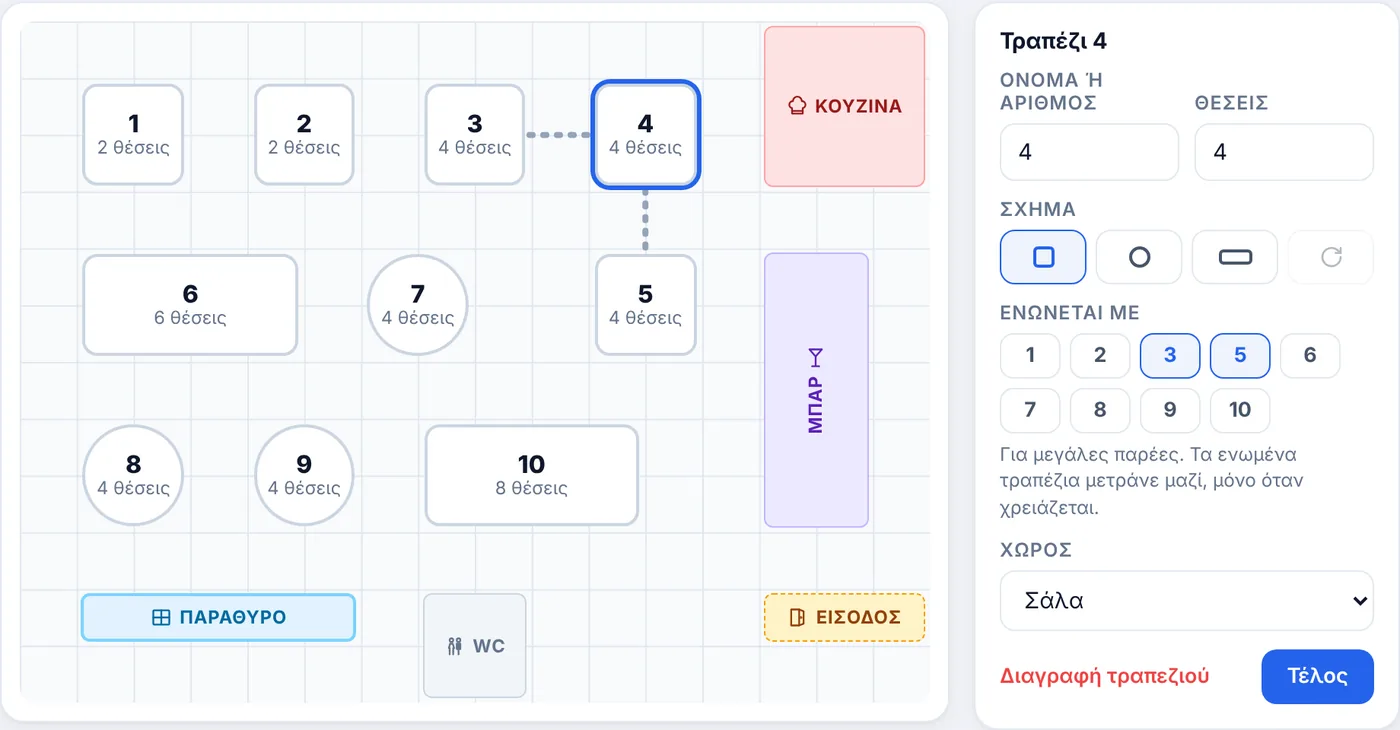
Drag them to where they really are, add areas (dining room, terrace, garden) and elements such as the bar, kitchen, entrance and toilets.
Set table joins
Choose which tables can be joined for large groups. Turn on the floor plan with one switch and from then on it works by itself.
What restaurateurs ask about the floor plan
Do I need an architect’s drawing for the floor plan?
No. Enter how many tables you have and how many seats each one has, and the floor plan builds itself. Then drag the tables to where they really are. For most restaurants this takes a few minutes.
How does the system choose a table for each booking?
It places the booking at the smallest free table that fits the party, so a table for six is not taken by two people. If the party does not fit any single table, it looks for the smallest table join you have set. If it finds none, the booking stays in the “No table” list and you place it yourself.
What about large groups?
You set which tables can be joined, for example 3 with 4 and 4 with 5. When a booking for 10 comes in, the system reserves the join 3+4+5 as one table. A booking can use up to 4 joined tables.
Can I change the table the system chose?
Yes, with two taps. From the booking card or from the floor plan itself, choose another table or join. The list shows next to each table whether it is free or which booking has it at that time.
Can I have a dining room, a terrace and a garden?
Yes. Each area has its own floor plan and its own tables, and you switch areas with one tap. You can also add elements such as the bar, kitchen, entrance, toilets, windows and walls, so the floor plan looks like your restaurant.
Does it affect guests’ online bookings?
No. The booking page works as before and guests do not see the floor plan. The floor plan organises the room for your staff: every new booking is placed at a table automatically and you see the picture of the evening.
Can guests choose a specific table?
No, and that is intentional. The restaurant decides the table, as with most booking systems, so that nobody “locks” the best table early and leaves gaps in the room.
Does it work on tablets and phones?
Yes. Both the live floor plan and the editor work with touch on tablets and phones, and update in real time on every device in the restaurant.
Does it cost extra?
No. The floor plan is included in every plan, together with all other features. You turn it on or off with one switch, and your tables stay saved.
Try it in your own restaurant
14 days free with every feature, no card required. Then from €99 a year, with no commission per booking.