More reviews, without having to remember
The morning after their visit, every guest receives a thank-you from your restaurant and a button to write a Google review. It happens by itself, every day.
- In line with Google’s rules
- See how many went to Google
- In the guest’s language
Set it up once, it works every morning
Add your link
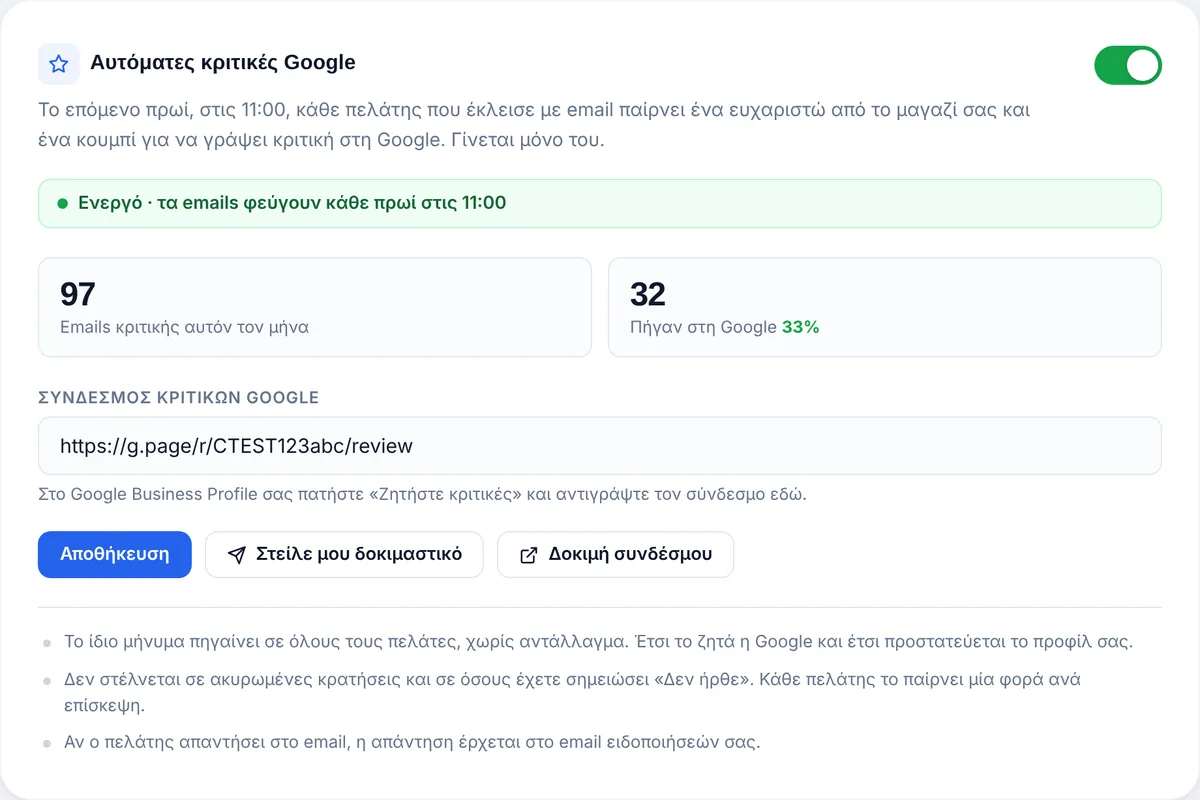
From your Google Business Profile, “Ask for reviews”, copy the link into TableReserve and turn on the switch.
The guest visits
You do not need to do anything. If someone did not come, tap “No-show” and nothing is sent to them.
The email goes out in the morning
From 11:00, with your restaurant’s name and a button that opens Google’s review form directly.
See whether it brings results
You know how many review emails were sent this month and how many guests tapped the button and went to Google. Before turning it on, send yourself a test email to see what your guests will receive.
- The same message to everyone, with no incentive, as Google requires.
- Once per visit, never for cancellations or no-shows.
- Guests’ replies arrive in your own inbox.
About reviews on Google
When does the guest receive the email?
The morning after their visit, from 11:00 in your restaurant’s time zone. The experience is still fresh, but you do not disturb the guest on the same evening.
Who receives it?
Guests who booked with an email, once per visit. It is not sent for cancelled bookings or to guests you marked as “No-show”.
Can I send it only to happy guests?
No, and that protects you. Google’s rules ask for the same message to everyone, with no incentive and without asking for a specific rating. That is why the email is the same for all guests.
Where do I find my review link?
In your Google Business Profile, tap “Ask for reviews” and copy the link into the TableReserve settings. With the “Test link” button you can check that it opens correctly.
How do I know whether it works?
In the “Reviews” tab you see how many emails were sent this month and how many guests tapped the button and went to Google. With “Send me a test” you see exactly the email your guests receive.
What if the guest replies to the email?
The reply goes to your restaurant’s notification email, so you can answer them personally.
Does it cost extra?
No. It is included in every plan and you turn it on or off with one switch.
Try it in your own restaurant
14 days free with every feature, no card required. Then from €99 a year, with no commission per booking.